Authentication and Authorization in Backend Systems
On this page
Every backend needs to answer two questions on almost every request:
- Who is this person? (Authentication)
- Are they allowed to do this? (Authorization)
These two concepts get mixed up constantly. They sound similar but solve completely different problems. Let’s break them apart.
Authentication vs Authorization
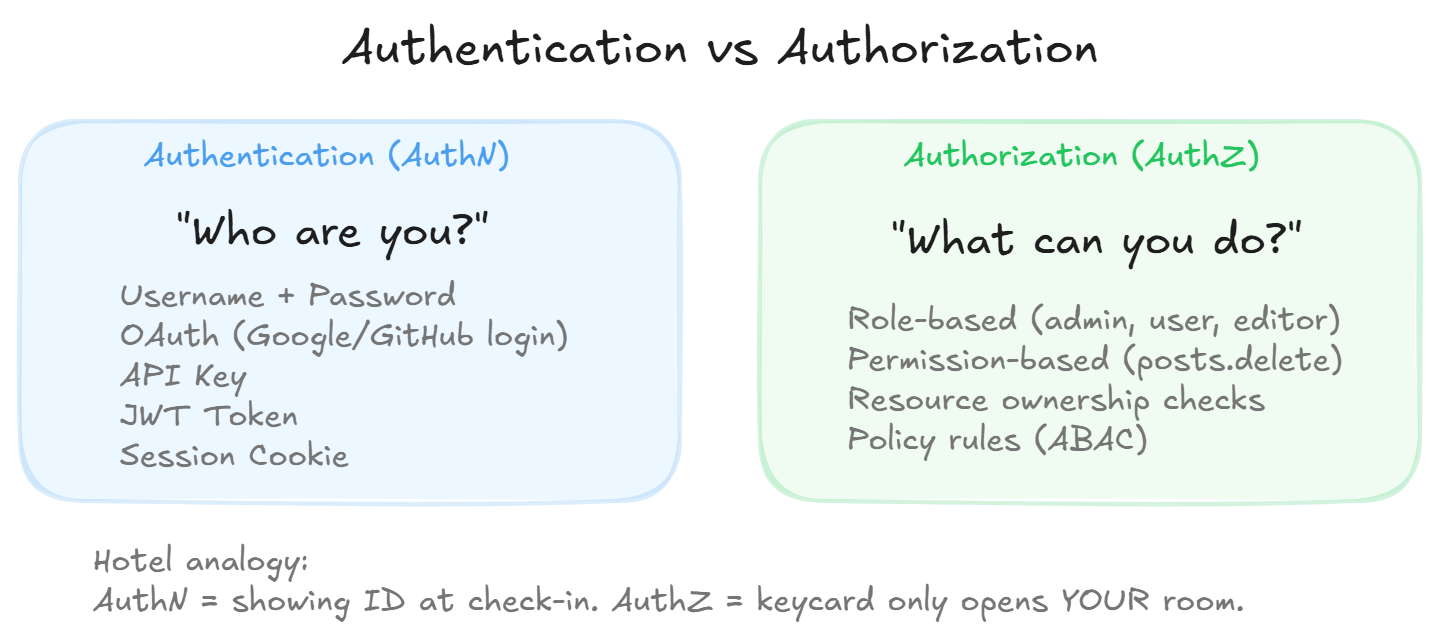
Authentication is proving identity. It’s the login step. “I am Shubham, here’s my proof.”
Authorization is checking permissions. “Shubham exists and is logged in, but can he delete THIS resource? Can he access the admin panel?”
Authentication always happens first. You can’t check someone’s permissions if you don’t even know who they are.
Think of a hotel. Showing your passport at the front desk is authentication. Your keycard only opening YOUR floor and YOUR room is authorization. Two completely different systems serving different purposes.
How Authentication Actually Works
There are two dominant approaches in modern backends:
Session-based (the classic approach):
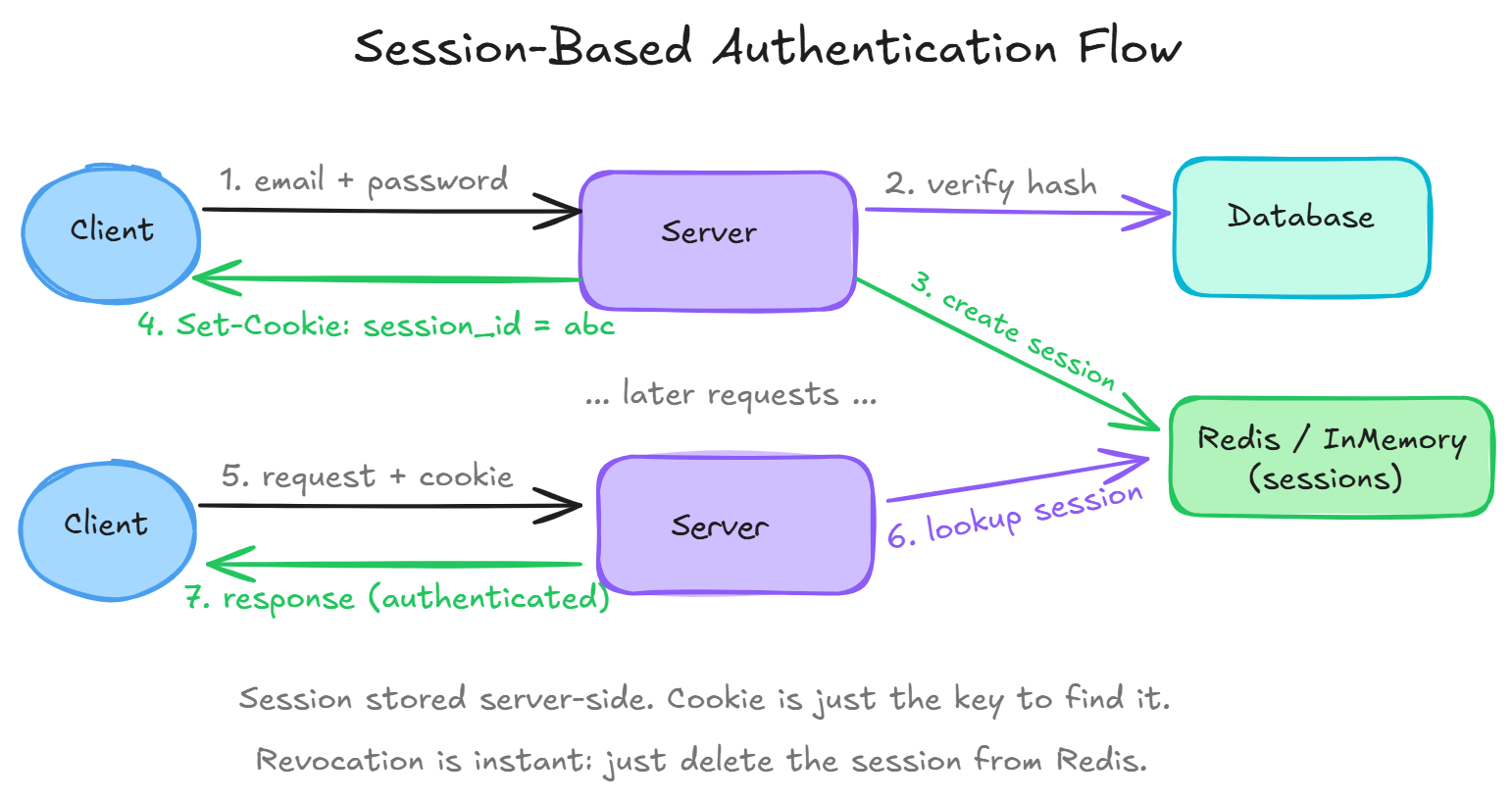
- User sends email + password
- Server verifies against the database (checks bcrypt hash)
- Server creates a session object, stores it in Redis/memory
- Server sends back a session ID as a cookie
- Every future request automatically includes that cookie
- Server looks up the session in Redis to identify the user
Pros: easy to revoke (just delete the session). Simple mental model. Cons: requires shared session storage. Harder to scale across multiple servers without Redis.
Token-based (JWT):
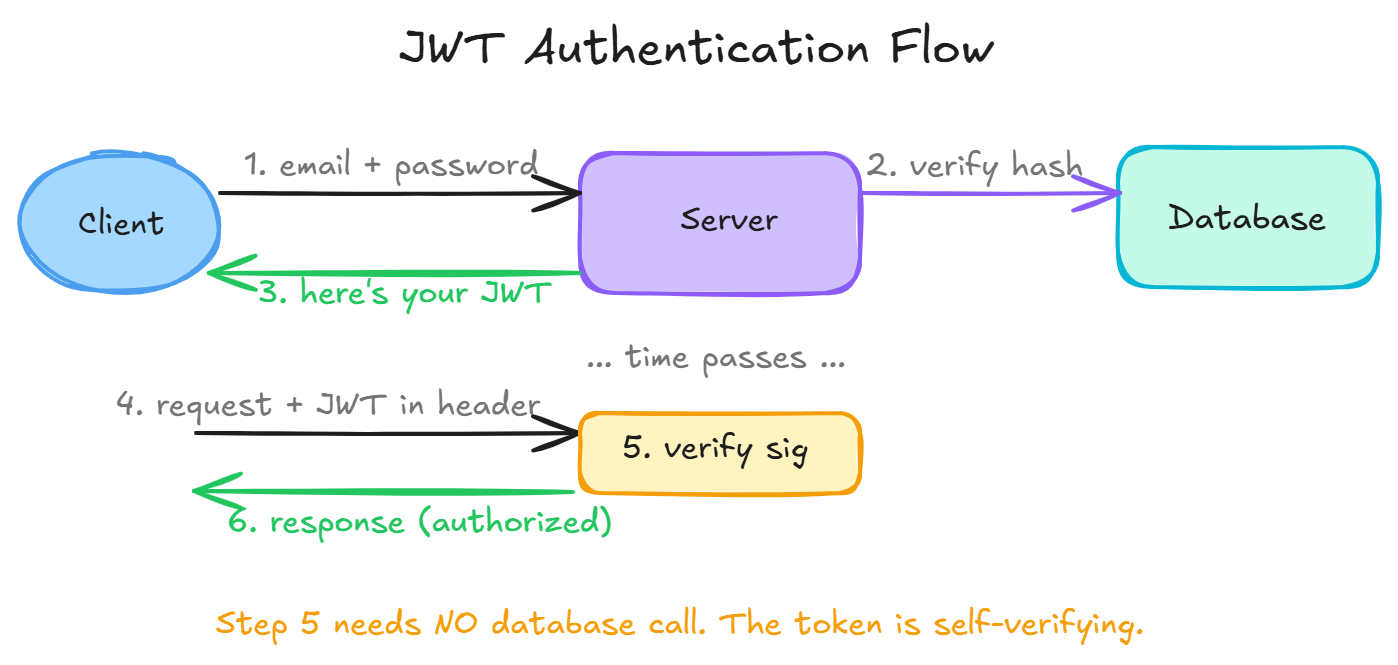
- User sends email + password
- Server verifies, then creates a JWT (JSON Web Token)
- The JWT contains user info encoded and signed with a secret key
- Client stores the token (localStorage, cookie, etc.) and sends it in the
Authorizationheader on every request - Server verifies the signature. If valid, the user is authenticated. No database lookup needed.
Pros: stateless, any server can verify independently, scales beautifully. Cons: can’t easily revoke a token before it expires (it’s self-contained). That’s why JWTs should have short expiry times (15 min to 1 hour) with a refresh token mechanism.
Inside a JWT
A JWT looks like three base64 strings separated by dots:
eyJhbGciOiJIUzI1NiJ9.eyJ1c2VySWQiOjQyLCJyb2xlIjoiYWRtaW4ifQ.signatureDecoded, the payload (middle part) is just JSON:
{"userId": 42, "role": "admin", "exp": 1700000000}The server signed this with a secret key. On future requests, it verifies the signature. If someone tampers with the payload (changing role to admin), the signature won’t match and the server rejects it.
Important: JWTs are signed, not encrypted. Anyone can decode the payload. Never put sensitive data (passwords, credit cards) in a JWT.
Authorization Strategies
Once you know WHO someone is, you need to check WHAT they can do:
Role-based (RBAC) Users have roles like admin, editor, viewer. Each role maps to a fixed set of permissions. Simple, works for 80% of apps.
Permission-based
More granular. Users have specific permissions: posts.create, posts.delete, users.manage. Can be grouped into roles or assigned individually. More flexible but more complex.
Resource-based / Ownership “You can edit YOUR posts but not other people’s.” Requires checking if the requesting user owns the specific resource they’re accessing. Super common in social apps and multi-tenant SaaS.
Attribute-based (ABAC) Complex rules involving multiple attributes. “Users in the EU can only access data stored in EU regions during business hours.” Enterprise compliance territory.
Where Auth Checks Live in Your Code
In a well-structured backend:
Authentication happens in middleware. It runs before every route handler, extracts the user from the token/session, attaches it to the request context. If auth fails, it returns 401 immediately and the handler never runs.
Authorization happens in the handler (or a route-level guard). “Does request.user have the admin role?” or “Does request.user.id match the resource’s ownerId?”
This separation keeps things clean. Your business logic functions never worry about parsing tokens. They just check request.user and make permission decisions.
Common Security Mistakes
- Storing passwords as plain text. Always hash with bcrypt (cost 12+) or argon2. Never MD5 or SHA-256 alone.
- JWT secret is “secret123”. Use a long random string (64+ chars). Rotate it periodically.
- Not checking token expiry. Always validate the
expclaim. Expired tokens must be rejected. - Frontend-only permission checks. Never trust the client. Always re-check on the server. Hiding a button doesn’t prevent someone from calling the API directly.
- Overly broad admin role. An “admin” that can do literally everything is a single point of compromise. Be granular.
OAuth and Third-Party Login
When users click “Sign in with Google”, that’s OAuth 2.0. The flow is:
- Your app redirects the user to Google’s login page
- User logs in on Google (not your server)
- Google sends your app a short-lived authorization code
- Your server exchanges that code for an access token (server-to-server call)
- Your server uses that token to fetch the user’s profile from Google
- You create (or find) the user in YOUR database and issue YOUR token/session
The key insight: you never see the user’s Google password. Google authenticates them, then tells you who they are. You handle authorization yourself.
Wrapping Up
- Authentication = who are you (login, identity)
- Authorization = what can you do (permissions, access control)
- JWTs are stateless and scale well, sessions are simpler but need shared storage
- Auth checks go in middleware, permission checks go in handlers
- Never trust the client for authorization
- Hash passwords with bcrypt, use long JWT secrets, validate expiry
Day 6 of 95 | Backend Engineering Series