Databases and PostgreSQL
On this page
Your backend is useless without persistent storage. When the server restarts, all in-memory data vanishes. Databases solve this, they store data reliably on disk and let you query it efficiently.
Why PostgreSQL?
There are dozens of databases out there. PostgreSQL is the go-to choice for most backends because:
- Rock solid reliability (used by Instagram, Spotify, Apple)
- Full SQL support with advanced features
- Handles millions of rows efficiently
- ACID compliant (your data won’t corrupt)
- Free and open source
- Amazing ecosystem of tools
How Your Backend Talks to a Database
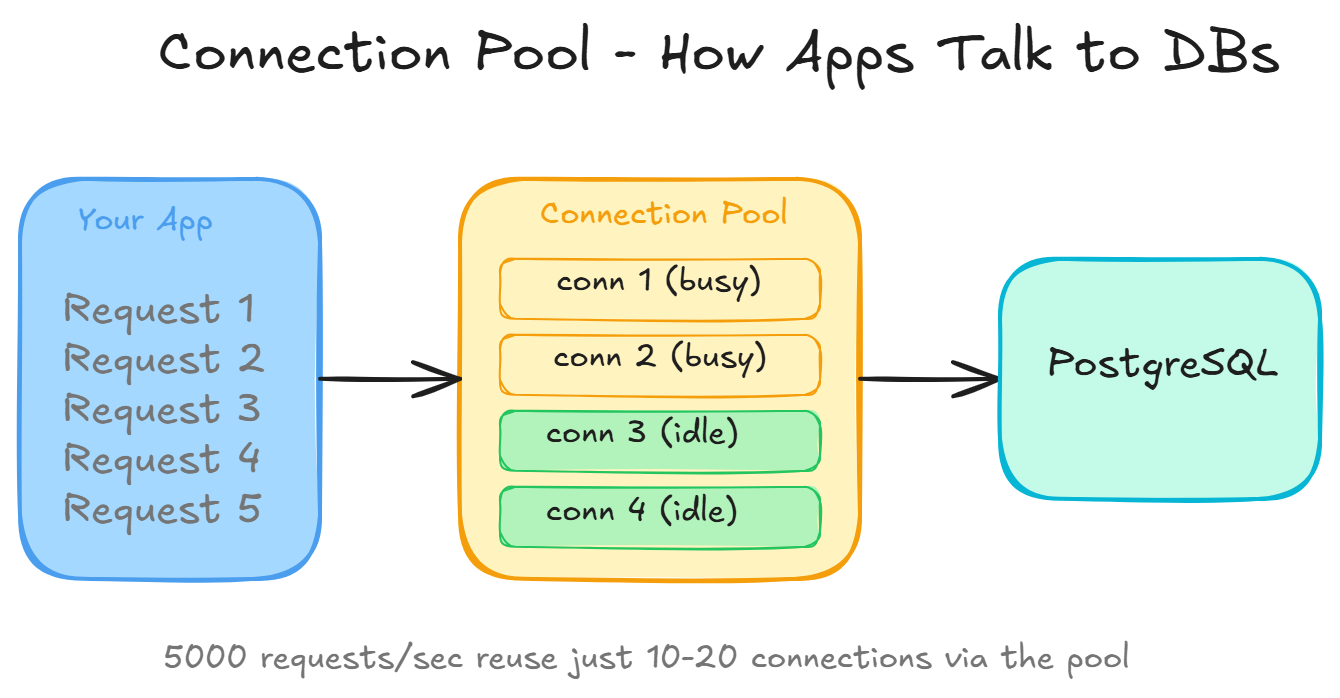
Your app doesn’t open a new connection for every request. That would be insanely slow (connections take ~50ms to establish). Instead, it maintains a connection pool, a set of pre-opened connections that get reused.
Flow:
- App starts: opens 10-20 connections to the database
- Request comes in: borrows a connection from the pool
- Runs the query
- Returns the connection to the pool
- Next request reuses the same connection
This is why a server handling 10,000 requests/second might only need 20 database connections.
Tables, Rows, Columns
Databases store data in tables (think spreadsheets):
users table:
| id | name     | email              | created_at |
|----|----------|--------------------|------------|
| 1  | Shubham  | shubham@email.com  | 2024-01-15 |
| 2 | shivam | shivam@email.com | 2024-01-16 |- Table = a collection of similar things (users, posts, orders)
- Row = one item (one user)
- Column = one attribute (name, email)
- Primary Key = unique identifier for each row (usually
id)
CRUD Operations in SQL
-- Create
INSERT INTO users (name, email) VALUES ('Shubham', 'shubham@email.com');

-- Read
SELECT * FROM users WHERE id = 1;
SELECT name, email FROM users WHERE created_at > '2024-01-01';

-- Update
UPDATE users SET email = 'new@email.com' WHERE id = 1;

-- Delete
DELETE FROM users WHERE id = 1;
Relationships
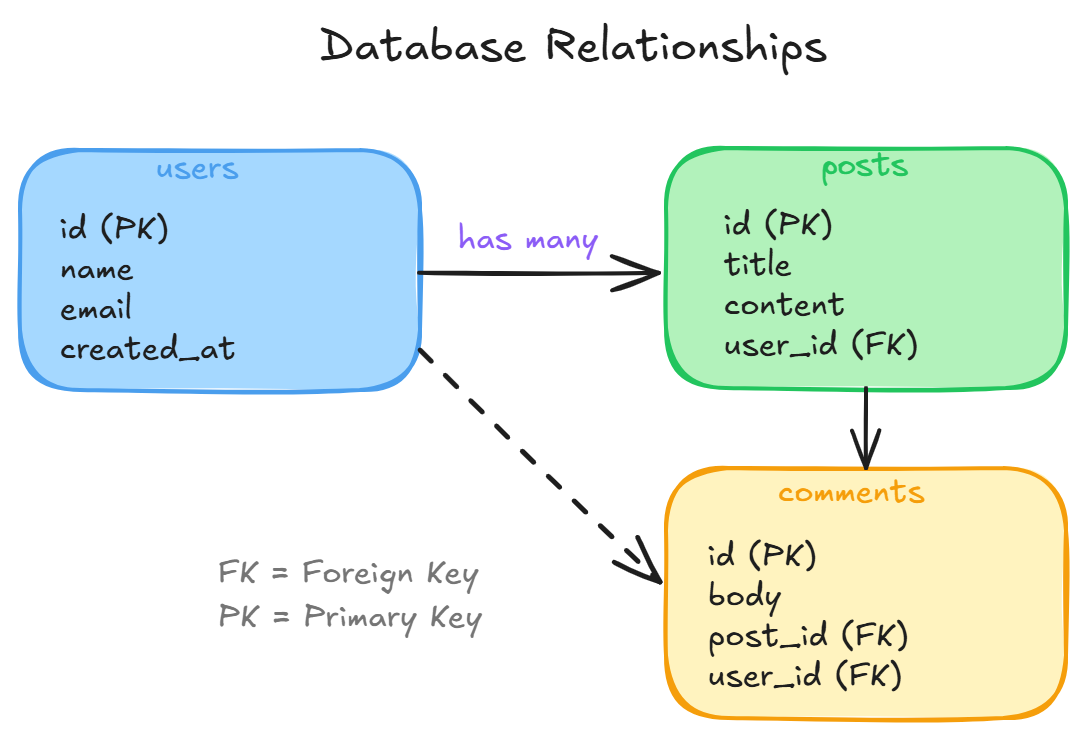
Real data has relationships:
- A user HAS MANY posts
- A post BELONGS TO a user
- A student HAS MANY courses, a course HAS MANY students (many-to-many)
These are expressed through foreign keys, a column in one table that references the ID in another table.
SELECT posts.title, users.name
FROM posts
JOIN users ON posts.user_id = users.id
WHERE users.id = 42;
Indexes, Making Queries Fast
Without an index, the database scans EVERY row to find what you want. With millions of rows, that’s painfully slow.
An index is like a book’s table of contents, it tells the database exactly where to look.
CREATE INDEX idx_users_email ON users(email);Now SELECT * FROM users WHERE email = 'shubham@email.com' is near-instant instead of scanning millions of rows.
Rule: add indexes on columns you frequently filter, sort, or join on. But don’t over-index, each index slows down writes.
Transactions, All or Nothing
Sometimes you need multiple operations to succeed together:
- Transfer money: debit account A AND credit account B
If the debit succeeds but the credit fails, you’ve lost money. Transactions prevent this:
BEGIN;
UPDATE accounts SET balance = balance - 100 WHERE id = 1;
UPDATE accounts SET balance = balance + 100 WHERE id = 2;
COMMIT;
If anything fails between BEGIN and COMMIT, everything rolls back. It’s like nothing ever happened.
Migrations, Evolving Your Schema
Your database schema will change over time. New tables, new columns, renamed fields. Migrations are versioned scripts that track these changes:
001_create_users_table.sql
002_add_avatar_to_users.sql
003_create_posts_table.sql
They run in order, and everyone’s database ends up in the same state. Never modify your production database by hand, always use migrations.
Wrapping Up
- PostgreSQL is the default choice for most backends
- Connection pools reuse connections for efficiency
- Tables/rows/columns model your data
- Foreign keys express relationships
- Indexes make queries fast (but slow writes)
- Transactions ensure data consistency
- Migrations track schema changes
Day 10 of 95 | Backend Engineering Series