Request Routing in Backend Architecture
On this page
A request arrives at your server. It says GET /users/42/posts. Now what? Your server has hundreds of functions. Which one should handle this specific request?
That’s routing. It’s pattern matching. The server looks at the method and the URL path, compares it against a list of registered patterns, and calls the matching function. Dead simple concept, runs every backend on earth.
How It Works Under the Hood
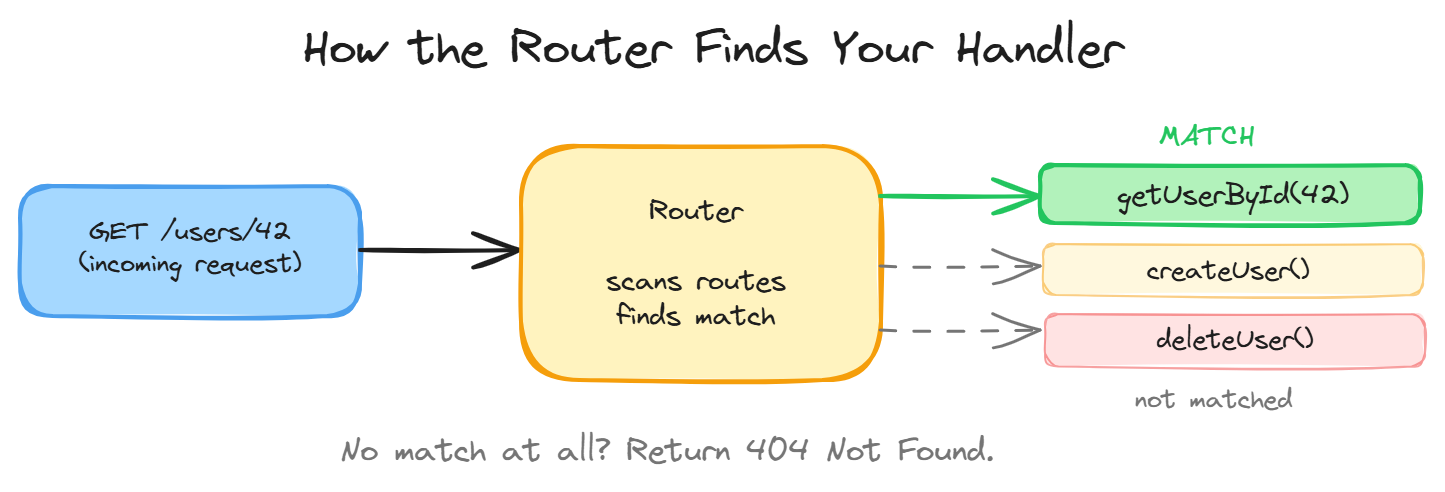
When a request comes in, the router does three things:
- Looks at the HTTP method (GET, POST, DELETE, etc.)
- Looks at the URL path (
/users/42/posts) - Finds a registered route that matches both
If it finds a match, it calls the associated handler function. If nothing matches, it returns 404 Not Found. That’s the entire algorithm.
Think of it like a switchboard operator. A call comes in, the operator looks at the number, plugs the cable into the right socket. Your router does the same thing with URLs and functions.
The Route Table
Every framework maintains a route table internally. It’s basically a lookup structure:
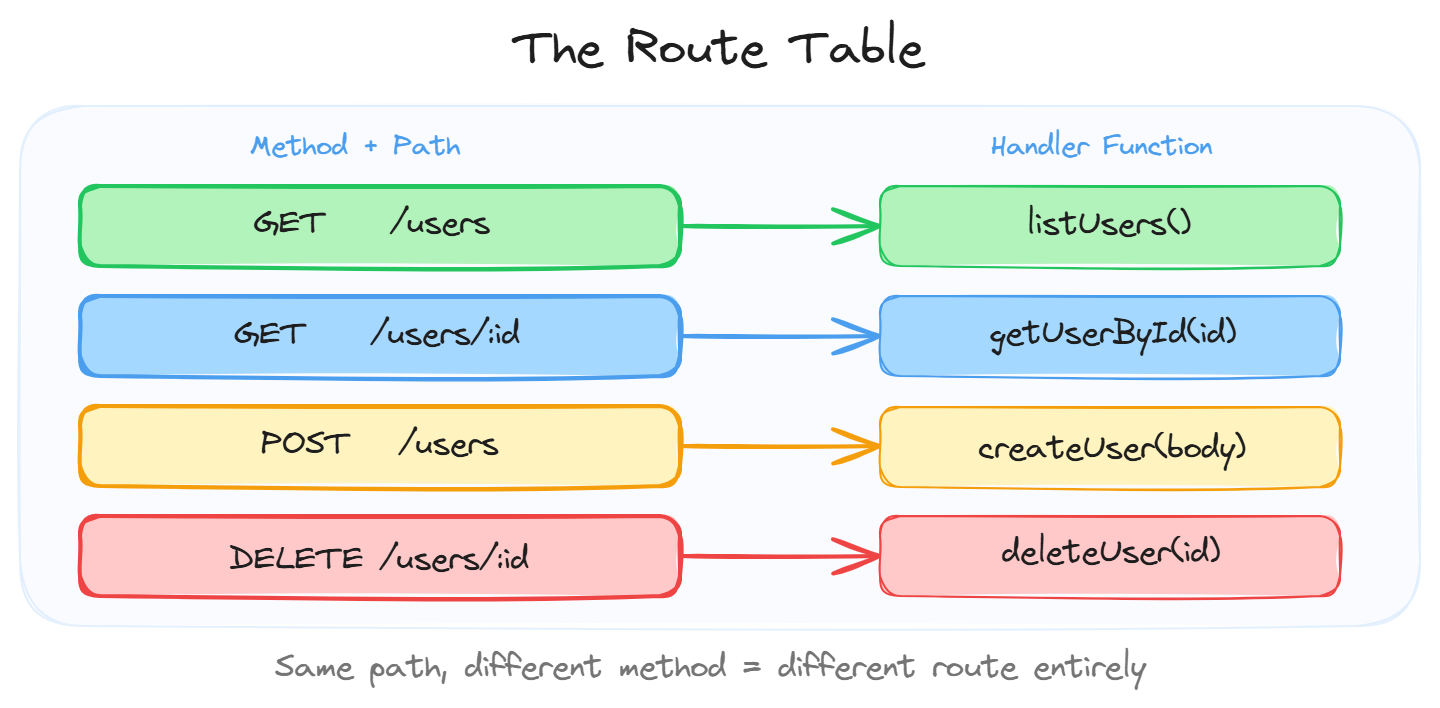
When you write something like app.get('/users', listUsers) in Express or @GetMapping("/users") in Spring Boot, you’re adding an entry to this table.
Important: GET /users and POST /users are completely different routes even though the path is identical. The method is part of the match.
Static vs Dynamic vs Wildcard
Static routes match character for character:
GET /health       matches exactly /health
GET /about        matches exactly /about
Dynamic routes have placeholder segments that capture values:
GET /users/:id    matches /users/42, /users/999, /users/abc
GET /posts/:slug  matches /posts/hello-world, /posts/my-first-post
The :id part is a parameter. When someone hits /users/42, the router extracts id = 42 and passes it to your handler. Every framework uses slightly different syntax for this (:id in Express, {id} in Spring, <id> in Flask) but the concept is identical.
Wildcard routes match anything:
GET /files/*path matches /files/images/cat.png, /files/docs/report.pdfThese are useful for catch-all scenarios like serving static files or building a proxy.
Route Priority and Ordering
Here’s a gotcha that bites people. What happens when multiple routes could match?
GET /users/me        getCurrentUser()
GET /users/:id       getUserById(id)
If someone requests GET /users/me, should it call getCurrentUser() or getUserById("me")?
Most routers follow this rule: specific routes beat dynamic ones. Static segments win over parameters. So /users/me correctly hits getCurrentUser().
But in some frameworks (Express notably), the first matching route wins. So order matters. If you register the dynamic route first, it catches everything including /users/me. Always put your specific routes before your generic patterns.
Route Groups and Nesting
As your app grows, you’ll have dozens or hundreds of routes. Nobody wants to type /api/v1/ at the beginning of every single one. Route groups let you nest routes under a shared prefix:
/api/v1
  /users
    GET  /          list all users
    GET  /:id       get single user
    POST /          create user
    DELETE /:id     delete user
  /posts
    GET  /          list all posts
    GET  /:id       get single post
This keeps things organized and makes API versioning (/v1, /v2) trivial. You just wrap the whole group under a new prefix.
Route Parameters vs Query Parameters
Two ways to pass information in a URL, and they serve different purposes:
Route params identify a specific resource:
/users/42           "give me user number 42"
/posts/hello-world  "give me the post with this slug"
Query params filter, sort, or modify the result:
/users?role=admin&page=2     "give me admins, page 2"
/products?sort=price&order=desc  "sorted by price descending"
Rule of thumb: if it identifies WHAT you’re looking for, make it a route param. If it modifies HOW you get it, make it a query param.
Nested Resources
Sometimes resources belong to other resources. The URL should reflect that ownership:
GET /users/42/posts        all posts by user 42
GET /users/42/posts/7      post 7 by user 42
POST /teams/5/members      add a member to team 5
This communicates hierarchy clearly. But don’t go too deep. More than 2-3 levels of nesting makes URLs ugly and hard to work with. At that point, flatten it or use query params.
What Happens Inside the Router (the nerdy bit)
If you’re curious about performance: most production routers use a radix tree (also called a trie). It organizes routes in a tree structure, splitting at each / segment.
Looking up a route in a radix tree is O(path length), not O(number of routes). So whether you have 10 routes or 10,000 routes, the lookup speed barely changes. That’s why frameworks like Go’s Gin can handle insane throughput without routing being a bottleneck.
Some simpler frameworks (Express) use a linear scan, checking each route top to bottom until one matches. Works fine for most apps but explains why route order matters there.
Wrapping Up
Routing is simple but foundational:
- It matches incoming requests (method + path) to handler functions
- Static routes match exactly, dynamic routes extract parameters
- Specific routes take priority over dynamic ones
- Group routes under prefixes for organization
- Route params identify resources, query params filter results
Every framework you’ll ever touch implements routing. Now that you understand what it IS, learning the syntax in any new framework takes about 10 minutes.
Day 4 of 95 | Backend Engineering Series